Your customers are trying to convert but your web-to-app journey is stopping them

TL;DR
- Web-to-app is not about opening the app, it’s about preserving customer intent as they move from mobile web into the app
- Web-to-app continuity is one of the most powerful levers for improving installs, onboarding, and in-app conversion.
- Most brands underestimate how much revenue they lose when web-to-app journeys quietly break.
- Because the leak happens in the handoff between web and app, most analytics setups never capture the loss
- Brands like AirAsia, Tata CLiQ, and Apartment List have documented measurable improvements after strengthening their web-to-app flows with AppsFlyer’s Deep Linking Suite.
- Fixing this hidden leak turns web-to-app from a fragile handoff into a predictable source of growth
You earned the click. And then you lost them
You’ve done the hard work. You ran the campaign, drove traffic to your mobile site, and earned the click. A real customer, with real intent, tapped “Open in App.” And then, quietly, you lost them.
Not because your product isn’t good. Not because your creative underperformed. But because somewhere in that split-second handoff between your mobile website and your app, the journey broke – and your customer had no idea why. Neither did you.
This is the web-to-app leak: one of the most common, most costly, and least visible conversion problems in mobile marketing today. It doesn’t trigger an error message. It doesn’t show up as a crash. It just looks like a drop, a bounce, a customer who “wasn’t ready.” But in most cases, they were ready – your routing infrastructure just wasn’t
What is web-to-app?
Web-to-app continuity is the ability to move customers from your mobile website into the right in-app experience without losing what they were trying to do. It preserves intent (what they clicked on and where they expect to land), context (what they were viewing or configuring), and what their state is (installed, logged in, returning) so the journey continues instead of restarting.
The “Intent Drop” pattern: Meet Emma
Emma is browsing your mobile site.
She finds something she wants – a product, a flight, a hotel, an offer, a loan she’d like to take, a reward she wants to redeem.
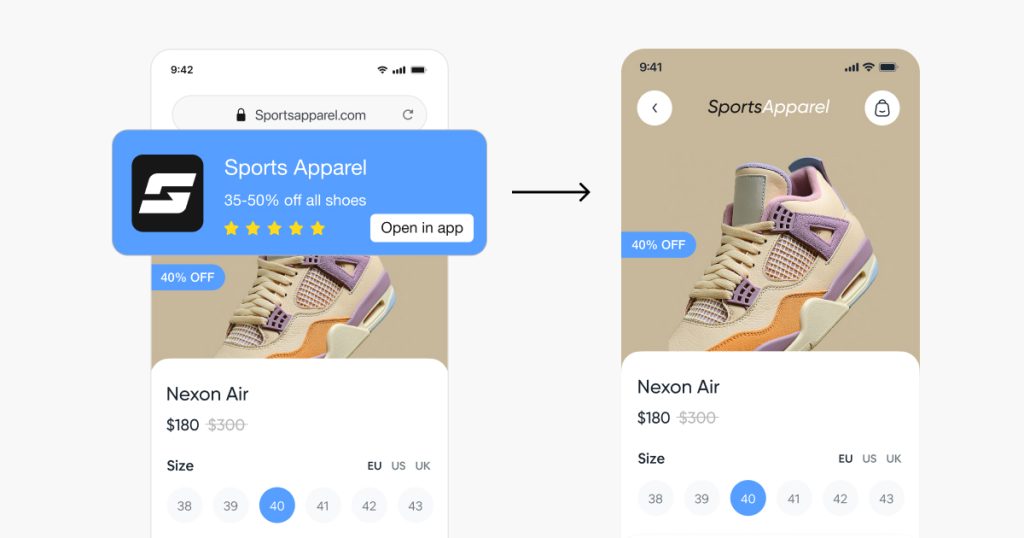
She taps your “Open in App” banner (often a Smart Banner – a website banner that opens the app or sends customers to install it) because she knows the app experience is faster, easier, and more personalized..
She’s ready to continue.
This is the Intent Drop – when a customer clicks with intent, but the handoff into the app drops the context and resets the journey.
Instead, here’s what happens to customers like Emma every day:
- The app opens, but drops her on the homepage instead of the item she tapped on
- Or it sends her to the App Store even though she already has the app installed
- Or she hits a login page before seeing any relevant content
- Or the banner takes her to a generic mobile web page in a different tab
- Or the fallback behaves differently on iOS and Android
- Or she clicks, but nothing happens…
Emma wants to buy, but her journey has hit a dead end..
This scenario is not a bug or an edge case – it’s the predictable outcome of treating web-to-app only in a channel redirection lens instead of a seamless continuation of customer intent.
Multiply Emma by thousands of daily visitors, and you start to realize just how big the leak is.
Why web-to-app matters more than most teams realize
Some teams are comfortable keeping customers on mobile web, but the performance gap between web and app is simply too large to ignore.
Regardless of which industry you’re in:
- Customers convert better in the app which is the native mobile device environment
- They complete authenticated actions more reliably
- They complete purchases and other key actions at higher rates
- They return more frequently
- They experience more personalized experiences
- They interact more deeply with loyalty programs, wallets, saved preferences, and push notifications
Mobile web is where discovery happens. But the app is where value compounds.
And the step between the two, that seemingly small moment in time when a customer tries to move from mobile web to app, is one of the highest-intent points in the entire experience. But it’s also one of the easiest to break.
Emma didn’t abandon the journey. The journey abandoned her.
Internally, you test your Smart Banners and they work. But these tests usually happen under controlled conditions: one device, one browser, one app version, one login state, and one clean session.
But in the real world, customers arrive from many different entry points and contexts that change how web-to-app behaves and how it should be optimized:
- Search and social feeds (including in-app browsers)
- Paid ads and affiliate/influencer links
- Email, SMS, and push
- Saved tabs and returning visits days later
- Logged out sessions, expired sessions, or private browsing
- Older app versions and mixed OS versions
When anything breaks in that handoff, it rarely shows up as a clear error. The customer just lands somewhere generic, gives up, and disappears. Your web metrics still show a click, your app metrics show a drop, and the gap in between gets misread as “low intent” or “weak creative” – even though the customer was ready to convert.
This is the hidden leak.
What’s actually causing the leak?
At its core, the leak exists because web-to-app is treated as a channel-specific implementation instead of a shared intent-resolution layer.
The problem isn’t your campaigns.
It isn’t only your banner design.
It’s that the routing behind the tap isn’t built to preserve intent and context consistently.
It’s your routing infrastructure.
Web, app, CRM, product, growth, and engineering teams each own different parts of the journey. They often make different assumptions about:
- Where the customer should land
- How login occurs
- What to show customers who have the app and to those who don’t
- How fallbacks should work
- How parameters should pass into the app
- How journeys are measured and optimized
Every team creates its own version of “what should happen after the tap.”
The result is an inconsistent and fragile web-to-app experience that breaks for real customers in real conditions.
The real lesson: web-to-app is an intent problem, not a linking problem
Most teams approach web-to-app as a technical or channel problem.
They ask:
- Is the Smart Banner implemented correctly?
- Does the deep link open the app?
- Does the fallback send customers to the right store?
- Are they seeing an error?
Those questions matter – but they miss the point.
The real job of web-to-app is not to open the app. It is to preserve customer intent across the transition.
When a customer taps “Open in App”, they are not asking to switch environments.
They are asking to continue the same action – with the same context, state, and expectation.
Web-to-app works when three conditions are consistently met:
- Intent is preserved: the customer sees exactly what they tapped on in mobile web.
- Context is resolved: login state, install state, device, and platform differences are handled automatically.
- The transition is invisible: the customer never feels the “jump” between web and app.
Most web-to-app journeys break because teams solve only the first part – opening the app – and leave intent and context to chance.
The impact of fixing your web-to-app leak
Just as importantly, fixing your web-to-app leak builds trust in your data – because teams can finally see what happens after the tap and optimize the journey with confidence
These companies boosted their web-to-app continuity using AppsFlyer’s Deep Linking Suite and our OneLink Technology and saw measurable improvements
AirAsia: Strengthening Smart Banners and web-to-app routing
Industry: Travel
Problem: Drop-off between mobile web browsing and app installs
Intervention: OneLink-powered Smart Banners with unified routing
Measured outcome: 5% increase in total installs driven by web-to-app paths
Tata CLiQ: Improving conversions by making web-to-app consistent
Industry: Ecommerce
Problem: Mobile web customers restarting journeys after moving into the app
Intervention: OneLink-enabled Smart Banners preserving context across the handoff
Measured outcome: Increased conversions after improving web-to-app consistency
Apartment List: Increasing early engagement by fixing entry-point continuity
Industry: Real estate marketplace
Problem: High-value mobile web customers failing to continue into onboarding in the app
Intervention: OneLink deep linking to stabilize entry-point continuity during onboarding redesign
Measured outcome: 2× increase in Day 0 logins, 10× increase in transferring highest-value web users to the app, 15% decrease in CPI, and 30% increase in user LTV
In all three cases, the common shift wasn’t more campaigns or new creatives, it was treating the web-to-app moment as a continuation of intent, not a redirect
The turning point: one routing system, one logic, one customer experience
Top-performing teams across retail, travel, finance, marketplaces, and lifestyle apps all do the same thing:
They unify routing with one engine, one set of rules, and one source of truth.
In practice, that means every entry point – regardless of where it comes from – follows the same logic:
Whether a customer is redirected from mobile web, a Smart Banner, an in-page CTA, an in-app browser, a referral flow, or even a help center article, the same routing engine (like the one behind AppsFlyer’s Deep Linking Suite) determines:
- Should the app open or the store?
- Which screen should the customer land on?
- What context should persist?
- Should login interrupt or not?
- What analytics need to be attached?
This is infrastructure, not an add-on.
And once routing is unified:
- CRM performs better
- Product teams see fewer continuity bugs
- Developers stop handling routing edge cases
- Customers stop abandoning before they ever reach the app
It’s the difference between “Emma bounced” and “Emma continued and converted.”
Key takeaways
- Most web-to-app journeys silently break, even when internal tests appear fine
- Web-to-app failures aren’t a banner problem – they’re an intent-preservation problem
- The leak happens in the handoff – before the app measures anything
- Brands like AirAsia, Tata CLiQ, and Apartment List have documented meaningful improvements after fixing routing consistency
- Unified routing transforms web-to-app from a fragile step into a reliable growth engine
- Teams that win are the ones that treat routing as customer experience infrastructure
The teams that get this right don’t just see better conversion numbers – they stop losing customers they already earned. If web-to-app is a meaningful entry point for your owned media journeys, see how AppsFlyer’s Deep Linking Suite helps teams preserve intent and context across web, email, QR, and deferred install flows – without requiring a paid attribution package. Explore the Deep Linking Suite or talk to an expert about your web-to-app leak