
Facebook deep linking: How it works, why it breaks, and how to fix it

TL;DR
- A Facebook deep link takes someone from a Facebook post, ad, or message, directly to the app or a specific screen inside your app
- Facebook intentionally suppresses Universal Links in its iOS in-app browser for its organic content, which is why links that work everywhere else often break on Facebook
- Paid app install ads get native direct deep linking support, but deferred deep linking still requires additional setup. Organic posts, Instagram Bio, Messenger, WhatsApp, and Facebook Wall have no native support at all.
- AppsFlyer solves Facebook deep linking differently for organic (OneLink + Smart Script) and paid (eDDL + Meta SDK on iOS)
What is a Facebook deep link?
A Meta deep link is a URL that takes someone from a Meta post, ad, or message directly to the app or to a specific screen within the app, rather than dropping them at the app’s home screen, a website, or a mobile browser.
Facebook deep links are a core part of social media marketing, connecting ad and post clicks directly to in-app experiences. For performance marketers, every extra step between a Facebook touchpoint and the right in-app screen is a drop-off waiting to happen. Deep linking removes that friction, so the person lands exactly where the ad or post promised.
Standard Universal Links and App Links are not enough on organic content in Facebook. Social apps often block them, and Meta does not send standard click data. Reliable deep linking requires handling two scenarios:
- Direct deep linking (app installed): Customers are routed directly to the app or to the right in-app screen using AppsFlyer OneLink, Universal or App Links or a standard URI scheme.
- Deferred deep linking (app not installed): Standard APIs do not work here. Routing requires Deferred Deep Linking (DDL), which uses install conversion data to direct customers.
Why is Facebook deep linking harder than other channels?
Facebook presents deep linking challenges that simply do not exist on other channels. Two things make it different.
- Facebook keeps end users inside its ecosystem: Standard deep links do not work natively on Facebook or Instagram organic content. Clicking one typically results in a broken journey, errors, a bounce, or the customer landing in Facebook’s embedded browser instead of your app.
- Meta is a Self-Reporting Network (SRN): Meta ad campaigns have their own deep linking setup that differs from standard AppsFlyer link implementation. Deep linking support varies by campaign objective, and deferred deep linking has specific prerequisites depending on campaign type and operating system. Getting the right setup in place requires understanding which approach applies to each campaign type, covered in detail below.
On iOS it gets more complex. Without Meta’s Aggregated Event Measurement (AEM) configured, DDL will not work. Smart Script steps in instead, routing the customer through a branded web landing page that preserves their context through the App Store and into the app.
On a standard channel, one link and one API is enough. On Facebook, you need a combination of OneLinks, eDDL, and Smart Scripts to make sure every customer lands on the right screen.
How do Facebook App Links work and where do they break?
Facebook App Links is Facebook’s own deep linking standard, separate from iOS Universal Links and Android App Links despite the similar name. It works like Open Graph tags: you add App Links meta tags to your destination web page, Facebook scrapes them when someone clicks the link, and uses the data to open your app if it is installed. It is Facebook-specific, which means adding these tags to your site does nothing for deep linking out of any other app or channel.
Where App Links falls short:
App Links only work when the app is already installed. If it is not, there is no way to preserve the customer’s intended destination through the install process. They go to the App Store and lose all context. The iOS fallback behavior is also broken. The al:web:should_fallback tag was designed to control where non-app customers land, but on iOS it does not work as documented. Setting it to false is the only reliable option.
Where Meta’s SRN status creates additional constraints:
Meta’s SRN setup adds two key constraints:
- UDL cannot route customers without click data, so deferred deep linking requires eDDL
- On iOS, eDDL depends on AEM; without it, routing must go through the web
Why do Facebook ads and organic posts behave differently for deep linking?
Both paid and organic Facebook links present unique routing challenges, but they require entirely different technical solutions. Troubleshooting one using knowledge from the other is where most teams go wrong.
Paid Facebook ads: Deep linking by campaign objective
Deep linking support in Meta Ads Manager varies by campaign type. Before setting up any campaign, confirm you are using a supported deep link format: AppsFlyer OneLink (if the app has Universal or App Link integration), Apple Universal Links, Android App Links, a custom URI scheme, or Facebook App Links.
| Campaign objective | Direct deep link | Deferred deep link | Key limitations |
| App Promotion / Install | Supported | Supported | Not supported for iOS 14.5+. Requires Facebook SDK (iOS and Android). iOS requires Advertiser ID collection enabled. |
| Sales | Supported | Not supported | Requires Enable Install Tracking. Destination must be a mobile app. |
| Traffic | Supported | Not supported | Requires Enable Install Tracking. Supports fallback to App Store or website. |
| Awareness | Supported | Not supported | Requires Enable Install Tracking. Configured at ad level. |
| Leads | Supported | Not supported | Requires Enable Install Tracking. |
Setup notes by scenario:
For App Promotion campaigns, no link is required in the campaign setup. Meta handles the app store redirection. After install, the AppsFlyer SDK attributes the install and the deferred deep link result is returned via Meta’s SDK.
For all other campaign types, place a deep link or web link in the campaign. This maps web attribution parameters to a link behind a Smart Banner or custom button built with Smart Script.
General prerequisites:
iOS requires Universal Links set up through the OneLink template’s Apple App Site Association configuration, or associated domains on the website. Android requires App Links implementation per Android developer guidelines and a OneLink template with SHA256 configured. Deep links are supported in static image and video ads, Advantage+ catalog ads, and carousel ads.
Organic posts, Messenger, and Facebook Wall
Organic posts have no native deep linking support. Links often break or open in embedded browsers, causing drop-off. To route customers correctly and measure results, use AppsFlyer OneLink paired with Smart Script to bridge the gap between Facebook and your app.
How do you deep link from Facebook?
The right approach depends on whether the touchpoint is organic or paid, and whether the customer already has the app installed.
For organic posts, Messenger, and re-engagement: OneLink and Smart Script
Do not rely on standard links for organic social. Social apps frequently break them or trap customers in embedded browsers.
For social-to-app journeys, use AppsFlyer OneLink paired with Smart Script. This uses a Facebook deep link to website as an intermediary, routing the customer through a branded web landing page that automatically detects their device and app state before delivering them to the correct in-app screen.
For re-engagement campaigns targeting installed customers: Facebook App Links
If your campaign targets customers who already have your app installed and deferred deep linking is not a requirement, Facebook App Links provides a straightforward routing option.
Step 1: Add App Links meta tags to the destination URL.
Add the following to the head of your destination page:
<meta property="al:ios:url" content="yourapp://content/123" /> <meta property="al:ios:app_store_id" content="123456789" /> <meta property="al:ios:app_name" content="Your App" /> <meta property="al:android:url" content="yourapp://content/123" /> <meta property="al:android:package" content="com.yourapp" /> <meta property="al:android:app_name" content="Your App" />Step 2: Set al:web:should_fallback to false.
This prevents customers without the app on iOS from being sent directly to the App Store without context. Setting it to false keeps you in control of where they land.
Step 3: Verify with the Facebook Sharing Debugger.
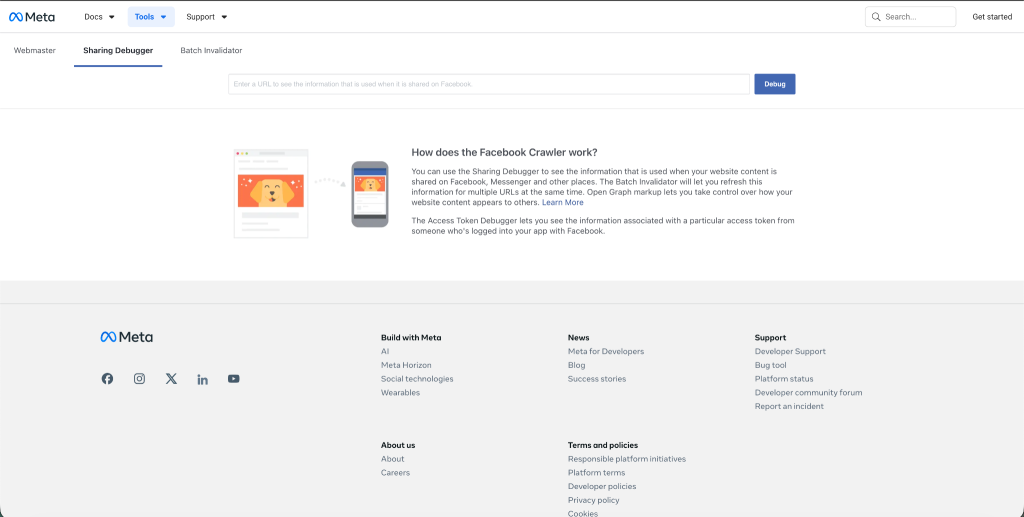
Paste your destination URL into the Sharing Debugger to confirm Facebook is reading your App Links tags correctly before publishing. If the tags are not being scraped, routing will not work.
App Links for Web are not supported for Catalog ads. For Dynamic Product Ads and Catalog-based campaigns, use Product Deep Links instead. If you already have App Links metadata configured, Facebook uses it automatically for catalog ads without requiring separate Product Deep Link setup. App Links are Facebook-specific and do not support deferred deep linking. For any campaign that needs to reach new customers, preserve attribution, or work reliably on iOS, use the web content preview approach below.
For most campaigns: Web content preview with embedded deep link (recommended)
This approach works across iOS and Android, for both installed and non-installed customers, and preserves attribution throughout.
Step 1: Create a web landing page that reflects your in-app content. This is the page the social platform routes customers to when they click your link. It should preview the content from the ad or post, whether that is a product, an offer, or a campaign destination.
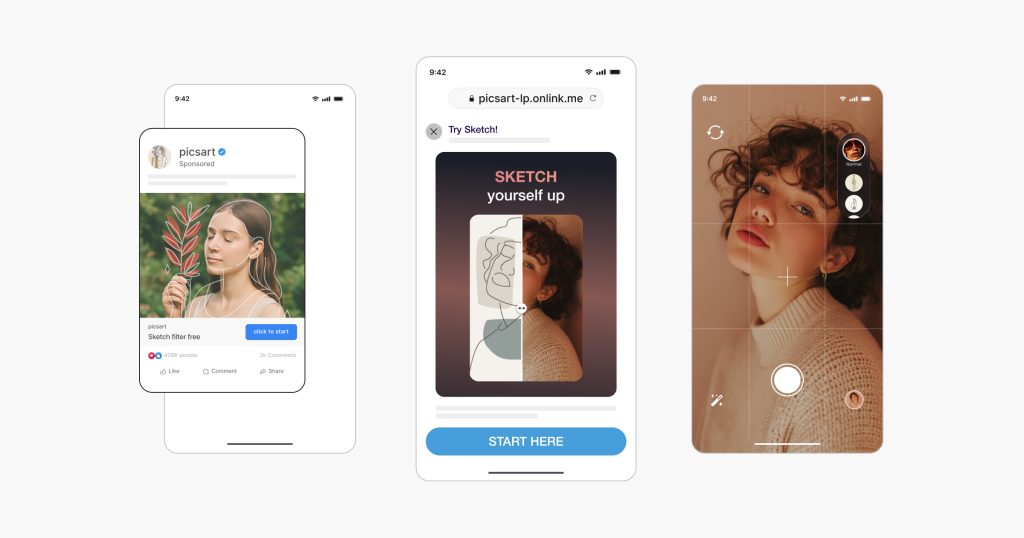
Step 2: Add a Smart Banner or Smart Script to the preview page. A lightweight layer on your mobile site automatically detects the customer’s platform and app status. Customers with the app see an “Open in app” prompt routing them directly to the right screen. Customers without the app see an “Install” prompt. The routing switches automatically based on install state.
Step 3: Use AppsFlyer OneLink to handle routing, deferred deep linking, and attribution. OneLink manages the if/else logic automatically. If the app is installed, it opens the in-app content directly. If the app is not installed, it routes to the store and defers the deep link to the first open. Attribution flows through for both scenarios.
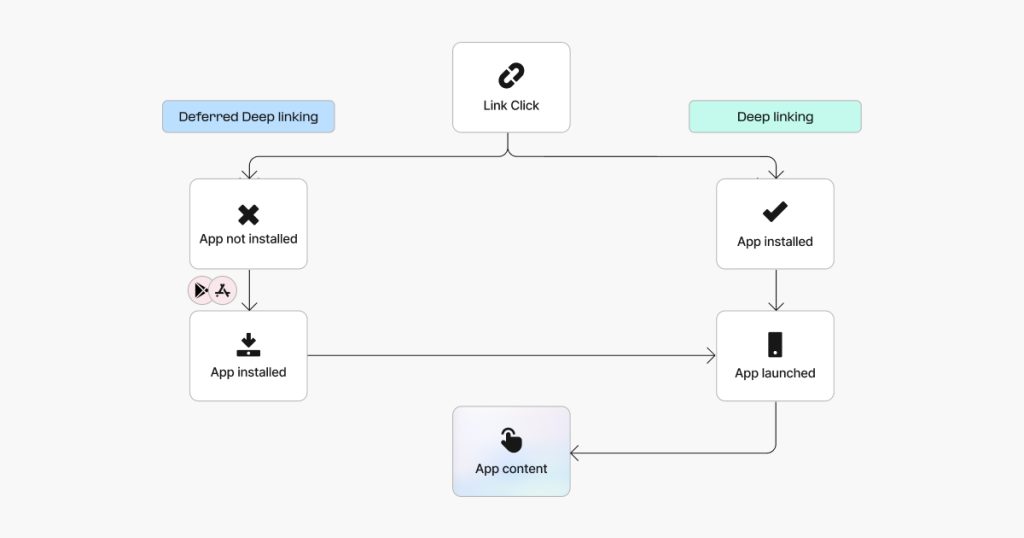
This approach is recommended for most brands because it preserves attribution, supports deferred deep linking, and works reliably to bridge the tap-to-app gap for social channels, where native social apps often block deep links and cause customers to bounce.
How does AppsFlyer handle paid Meta campaigns? Three scenarios
Meta is a Self-Reporting Network (SRN) that does not send standard click data, so the standard Unified Deep Linking (UDL) implementation does not apply. Three scenarios cover the full picture.
Scenario 1: App already installed (iOS and Android)
To add deep links to your paid campaigns, place an AppsFlyer OneLink or standard URI scheme directly in your Meta campaign setup, for example in the iOS and Android app URL field in Meta catalogs for Dynamic Product Ads. OneLink detects the device state and opens the right in-app screen directly.
Scenario 2: App not installed (Android, and iOS with AEM configured)
Standard UDL fails because Meta does not send the click data it needs. Implement Extended Deferred Deep Linking (eDDL) via onConversionDataSuccess. When the customer installs and opens the app, eDDL uses conversion data such as campaign or ad set parameters to route them to the intended screen.
Scenario 3: iOS without AEM configured
Without Meta’s Aggregated Event Measurement (AEM), eDDL will not work on iOS. Route these customers via the web using AppsFlyer Smart Script, which preserves their context through the App Store download and delivers them to the right in-app destination.
What do most marketers miss about Facebook deep linking and attribution?
Getting the link to open the mobile app is only half the job. Knowing which Facebook touchpoint drove that open is the part most teams do not have visibility into.
Without attribution at the link level, you cannot measure campaign ROI, optimize toward audiences that actually convert, or compare Facebook against other channels. You also cannot connect specific posts or ads to the in-app events that determine real value.
Meta’s SRN status is the reason the standard attribution flow does not apply as Meta does not send standard AppsFlyer clicks, eDDL pulls conversion data from install attribution instead. On iOS, whether AEM is configured determines which method runs. Without AEM, Smart Script handles the gap.
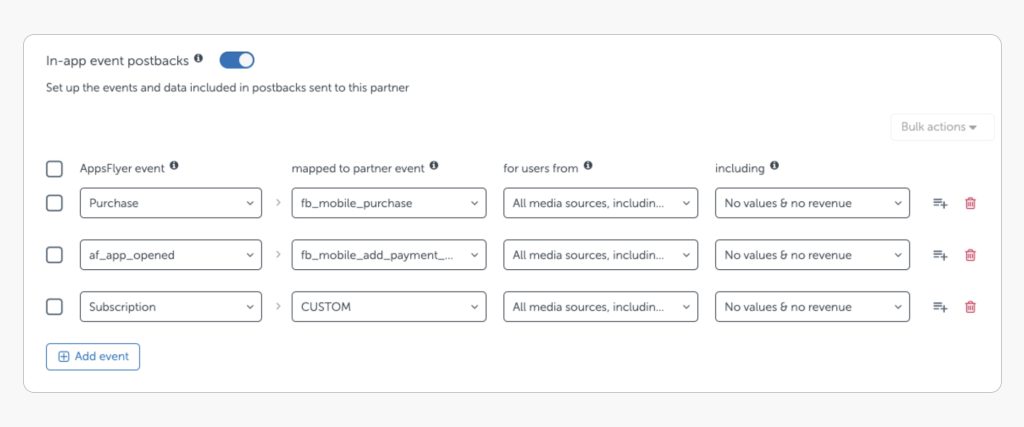
Deep links alone cannot de-duplicate Facebook installs, attribute view-through conversions, or send optimization signals back to Meta’s ad products. Only MMP-level integration provides the click timestamp Meta needs for accurate attribution.
eCommerce brand PatPat embedded AppsFlyer OneLinks into their Meta Dynamic Product Ad campaigns – placing them directly in the iOS and Android app URL fields in Meta catalogs. The result was a 3x revenue lift and a 65% increase in average revenue per customer (ARPU).
“Our team has successfully utilized OneLink in our Dynamic Product Ad campaigns to drive better performance on ROAS and DAU over the long term. Through our test with AppsFlyer in Meta, we have confirmed the effectiveness of our strategy.” — PatPat
Why use AppsFlyer for Facebook deep linking?
Running Facebook campaigns across paid and organic, iOS and Android, means dealing with the iOS browser restriction, Meta’s SRN attribution gap, and the paid vs. organic split at the same time. Handling each separately is not practical. A platform-level solution is what makes consistent routing, deferred deep linking, and attribution possible across every touchpoint.
iOS browser restriction: Without a platform handling the iOS browser gap, organic post clicks on iPhone route to Facebook’s embedded browser, not your app. OneLink routes through a Smart Script web preview so the experience works regardless of iOS restrictions.
Deferred deep linking: Without eDDL, new installs from Meta campaigns land on your home screen, not the product or offer that generated the click. eDDL uses install attribution data to deliver the right destination on first open.
Attribution across every touchpoint: Without MMP-level integration, you cannot connect Facebook clicks to in-app events, de-duplicate installs, or send optimization signals back to Meta’s ad products. AppsFlyer provides the click timestamp Meta needs for accurate attribution across paid ads, organic posts, and Messenger.
One link for every surface: Without a unified deep linking platform, paid ads, organic posts, and Messenger each require separate configurations. A single AppsFlyer OneLink handles all three without additional setup per channel.
“The process of migrating was much easier than we expected. We literally just switched overnight and haven’t looked back since. The migration to AppsFlyer really was seamless.”
Egemen Bor, Senior Mobile Growth Manager, Hepsiburada
Ready to fix your Facebook deep linking?
As Meta expands its ad formats and iOS privacy frameworks continue to restrict standard click data, the gap between what native Facebook tools can handle and what a measurement platform provides will only grow, making MMP-level deep linking and attribution the baseline for any team running Facebook at scale.Getting Facebook deep linking right across paid ads, organic posts, iOS, and Android takes more than App Links tags. AppsFlyer OneLink handles the routing, deferred deep linking, and attribution in one setup, so every Facebook touchpoint is measured and every customer reaches the right destination. Talk to our team to see how it works for your campaigns.
FAQ
A Facebook deep link is intended to open a specific in-app screen rather than the home screen. However, because Meta does not send standard click data, standard deep linking does not work natively for deferred routing. Customers who already have the app can be routed directly using AppsFlyer OneLink or a URI scheme. Customers without the app require a secondary method: Extended Deferred Deep Linking (eDDL).
Standard deep links frequently break inside social platforms. Facebook does not support standard deep linking natively, so customers often end up stuck in Facebook’s embedded browser instead of your app. The fix depends on the channel. For paid Meta campaigns, implement eDDL. For organic posts, use a Smart Script paired with AppsFlyer OneLink to route customers through a branded landing page that bridges the gap between Facebook and your app.
Facebook App Links is Facebook’s own Open Graph-style meta tag standard that tells Facebook how to route customers into your app when they click a link. Rather than manually managing these HTML meta tags, the reliable approach is a dedicated deep linking platform.
For paid Meta campaigns, use AppsFlyer OneLink in your ad setup and implement eDDL in your SDK to handle deferred routing. For organic posts, use AppsFlyer Smart Script to build a branded landing page that routes customers based on their platform and app state. Test across real devices, OS versions, and install scenarios before launch.
Not through standard links. Because Meta does not send standard click data, primary deferred deep linking APIs fail. AppsFlyer handles this for Meta campaigns using eDDL, which waits for the app to install and uses conversion data to route the customer correctly. On iOS, this requires Meta’s Aggregated Event Measurement (AEM). Without AEM, Smart Script takes over.
A Universal Link is Apple’s native method for opening an app directly from a web URL. Standard links including Universal Links often break inside social platforms. A reliable Facebook deep link requires a combination of OneLinks, eDDL, and Smart Scripts to ensure customers are routed correctly from Facebook into your app across every channel and install scenario.