Android deep linking: how it works (and why most setups fail)

TL;DR
- Android deep linking sends users directly to specific in-app content instead of the home screen
- When implemented correctly, deep links can drive up to 4× higher conversion rates, according to AppsFlyer data
- Most implementations fail when the app isn’t installed or when campaign context is lost through the Play Store
- AppsFlyer solves this with deferred deep linking and OneLink, its cross-channel routing engine, preserving attribution and routing users from click to conversion
What is Android deep linking?
Android deep linking allows a link to open a specific screen inside a mobile app instead of the app’s home page.
These links can be placed in ads, emails, websites, QR codes, or social media posts, and route users directly to the relevant in-app content.
Android supports three main types of deep links:
- Standard deep links (URI schemes)
- Android App Links
- Deferred deep links
Each one of these types solves a different part of the user journey, from opening apps that are already installed to routing new users through the Play Store.
Choosing the right one lets you create seamless user journeys from any channel into your app.
Types of Android deep links
- Android App Link: also known as a verified App Link, follows Google’s HTTPS-based standard. More reliable than a custom URI scheme, but if the app isn’t installed it falls back to the web and loses campaign context through the Play Store.
- Deferred deep link: the only type that works in all situations. It saves the user’s original destination before they go to the Play Store and retrieves the deep link data on first open so users land exactly where they intended to go.
- Standard deep link: uses custom URI schemes to open specific content in your app, but only if the app is already on the user’s device. Because the domain is not verified at the OS level, this method is more prone to security issues. If the app is not installed, the link shows an error or nothing at all.
| Type of deep link | Works if app installed | Works if not installed | Preserves attribution | UX reliability | Security |
| Custom URI schemes | ✅ | ❌ | ❌ | Medium | Low |
| Android App Links | ✅ | ⚠️ (fallback to web) | ⚠️ | High | High |
| Deferred deep links | ✅ | ✅ | ✅ | Highest | High |
How does Android deep linking work?
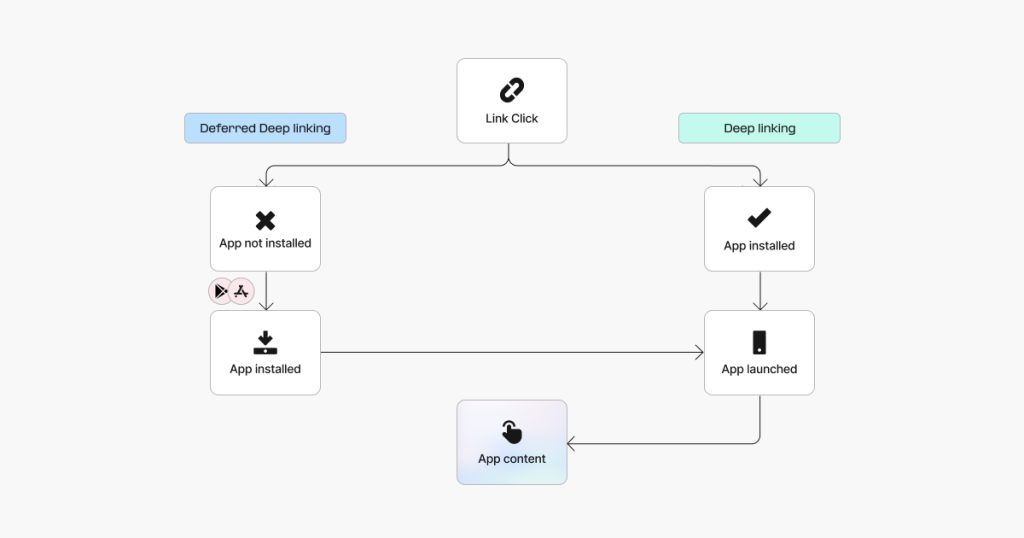
When a user clicks a web link configured as a deep link, Android follows a simple resolution process:
- Android reads the URL and triggers an intent action to match the link to the correct app activity.
- If the app is installed, Android opens the corresponding in-app screen directly.
- If the app is not installed, the user is redirected to the Play Store. Without deferred deep linking, all context is lost at this point: the product they clicked, the campaign that brought them there, the promo code in the URL.
- With deferred deep linking, the deep linking platform captures the original link context before the Play Store redirects and restores it when the app opens for the first time.
A verified Android App Link is Google’s answer to these gaps. It adds domain verification through the Digital Asset Links file on your domain. If verification passes, the app opens directly. If not, the default behavior is to open the web browser instead. Custom URI schemes, the older method, had no verification and no fallback when the app wasn’t installed, which exposed apps to security risks.
Why deep linking is a growth problem, not a dev ticket
Most teams hand deep linking to engineering with one instruction: make the app open. That misses the point entirely. The real issue is mobile attribution, routing, and what happens to the campaign context along the way.
Consider the following example: a user clicks your paid ad and expects to land on that exact product, but instead gets dropped on a generic home screen. That gap directly determines your ROAS and whether you can scale.
Deep linking is lifecycle marketing infrastructure, connecting every touchpoint from Google search and paid ads to your website and QR codes directly into your app.
Implementing deep links without the right context makes it impossible to create reliable attribution and campaigns plateau as a result.
Where most setups break
If your Android deep links keep breaking and you can’t figure out why, you’re not alone. Most implementations fail for the same four reasons, and none of them show up in your open rate.
- App not installed: A user clicks your campaign link, hits a dead end, downloads the app later and opens to a home screen with no idea what brought them there. All the deep link content they were supposed to see is completely lost.
- Campaign context lost through the Play Store: Even when the install is attributed correctly, the in-app experience breaks. The app has no record of what the user originally clicked on, so a user who came from a promo code link lands on a generic home screen with no offer in sight.
- Disambiguation dialog: When multiple apps share the same URI scheme, Android shows a dialog asking which app to open. Most users just close it and move on.
- Reinstall flows: A lapsed user sees a retargeting ad, reinstalls the app, and gets treated as brand new, with none of the campaign data or context needed to personalize their experience, even if they previously opened the app dozens of times.
Get the link type right and all four of those problems are resolved. Deep linking behavior depends on the OS, the browser, the device, and the state of the app. Getting it right means having a fallback strategy for every scenario where default routing fails. Think of it as link insurance: the goal is to make sure a broken user journey never impacts your business.
How to make every stage of the deep linking journey work
Deep linking looks simple on the surface, but underneath it you’re managing a multi-stage user journey: click, install, open, attribute, route, personalize. When any one of these stages breaks, you lose conversions you’ll probably never trace back to the source. What makes it genuinely frustrating is that your app open rate won’t flag anything. It can look like it’s doing its job while quietly failing your campaign every time attribution drops at the end.
Every stage needs to work as one. When they do, the app matches user expectations at every touchpoint. When even one of them is off, you’re leaving conversions on the table without knowing it.
How AppsFlyer handles this
AppsFlyer’s Deep Linking Suite is built on OneLink, a cross-channel routing engine that matches every click to the correct in-app destination. It evaluates device type, OS, browser, install status, and campaign parameters to ensure users reach the right content.
Its deep linking handles paid ads, email, push notifications, text messages, QR codes, and social on Android the same way, with no separate links per channel. OneLink handles Android natively and extends to iOS using the same link, so teams running cross-platform campaigns do not need separate implementations. When a user clicks through without the app on their device, AppsFlyer saves their intent. After they download from Google Play, they arrive directly at the content they originally clicked.
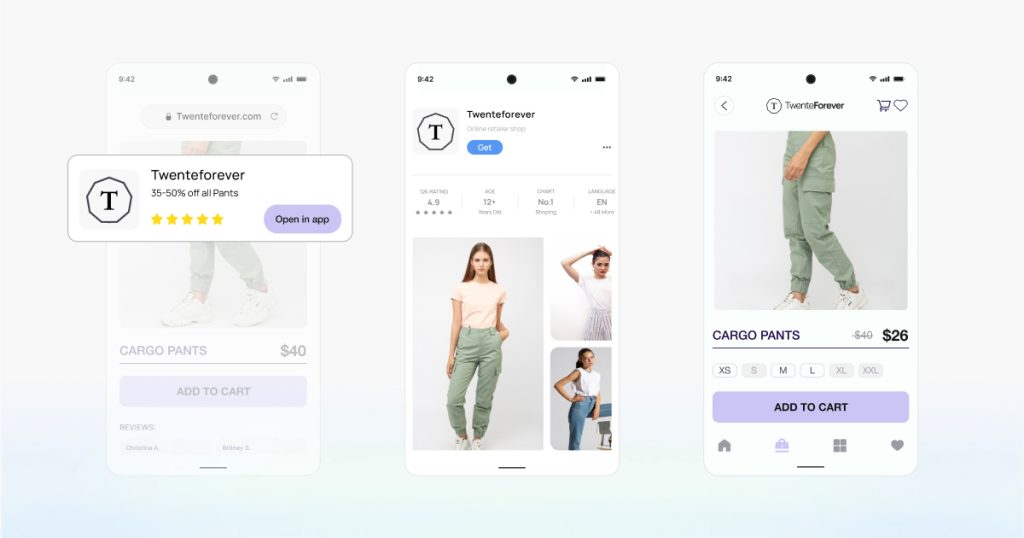
AppsFlyer’s Unified Deep Linking (UDL) API gives developers a single integration point regardless of link source, using the data provided at the time of the click to personalize the in-app experience. Attribution runs across the full flow from click to install to in-app event, so growth teams can see exactly what drove the conversion and act on it.
Results from AppsFlyer’s Deep Linking Suite:
Albertsons: 113% increase in app traffic, 1.2M+ visitors from QR codes in two months.
“We more than doubled our mobile app traffic using AppsFlyer QR codes and deep links.” Ryan Lee, Senior Product Manager, Albertsons
Tata CLiQ: 300% increase in web-to-app conversions, 400% ARPU uplift using Smart Banners powered by OneLink.
“AppsFlyer has been a very valuable partner who has not only helped us on the fundamental implementation of marketing analytics and attribution but also worked with us to implement other innovative features. This has led to our achieving better efficiency even while scaling our investments.” Divesh Sawhney, Head of Performance Marketing, Tata CLiQ
Sayurbox:137% improvement in overall conversions, 86% increase in purchase conversions using deep linking.
“With a more seamless, personalized, and branded orchestration of our user referral journey, we’ve been able to boost the overall effectiveness of our campaigns while freeing up our team to channel their efforts towards more strategic initiatives.” Adelia Ekaputri, Digital Media Specialist, Sayurbox
Letyshops: 40% email-to-app conversion rate, 700,000+ app installs in five months using OneLink.
“AppsFlyer helped us grow our user base. Their deep linking suite leverages email service provider links without losing attribution or contextual data.” Nikolaiev Dmytro, UA Manager, Letyshops
Deep linking across every channel
Paid ads
A user clicks a Meta Dynamic Product Ad on Android without the app. AppsFlyer routes them through the Play Store and on first open they land on that exact product with the right promotion code. The network gets the right signals to optimize against (“bring me more users like this one”), and the UA team can scale the campaign.
Email and CRM
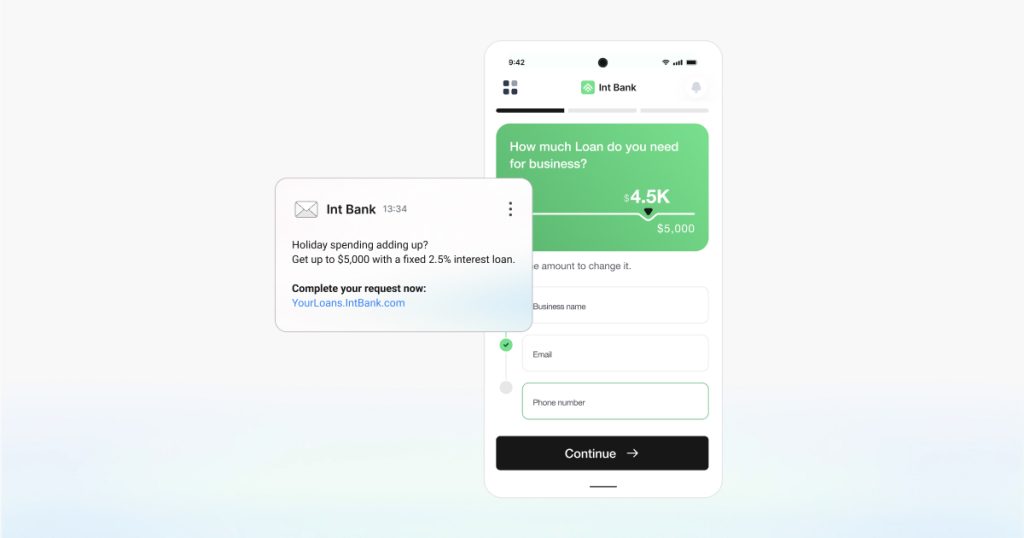
A re-engagement email links to a limited-time offer and the user lands directly on that offer inside the app, not the home screen. A bank’s CRM team sends a personalized loan offer to existing customers. The deep link takes each recipient to the relevant content in the app where they can review and sign the offer, without any prompts, interstitial pages, or unnecessary logins.
Retargeting
A lapsed user clicks a paid retargeting ad and lands on the exact in-app screen with the right content from the ad. A travel app doing this well will serve users the specific flight they browsed but didn’t book. The deep link drops them directly onto the booking screen with their details already loaded. 40% of remarketing conversions happen on day one and over 75% happen within the first week, so the routing has to work immediately.
Re-engagement
Push notifications are app-to-user by nature. A retail app sends a push notification about a flash sale ending in 24 hours. When the user taps the notification, they land straight on the sale inside the app, not the home page.
Personalization
Every user who installs through a campaign link gets a first-open experience that matches the campaign they came from. A fitness app is a good example: a user who clicked a yoga ad lands on yoga content on first open, while a user from the running campaign lands on running content. AppsFlyer makes that possible at scale, automatically.
QR codes and offline
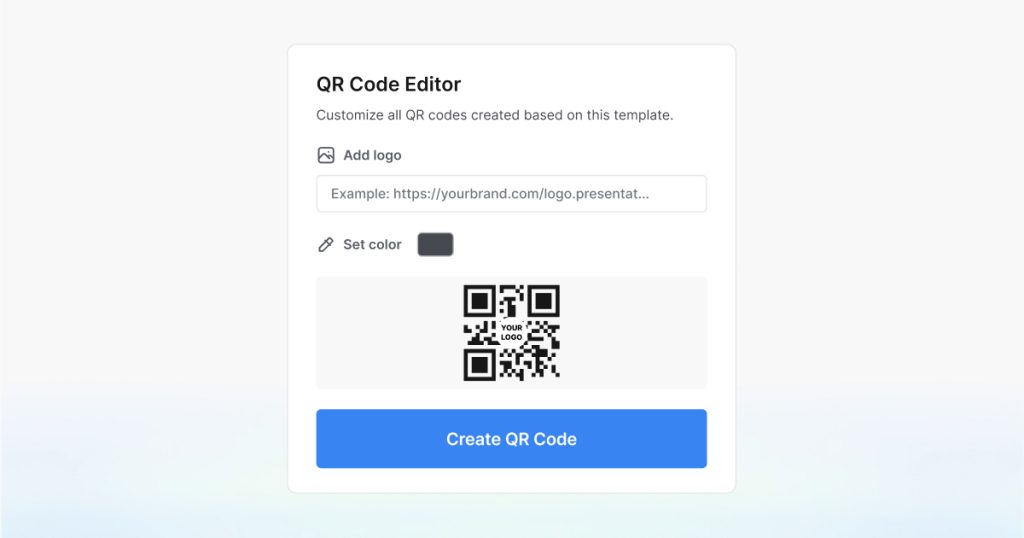
Any owned media surface can carry a QR code or contextual link that routes users into a relevant in-app experience: product packaging, print ads, in-store displays, even your own website.
Pizza Hut placed AppsFlyer QR codes on pizza box toppers to bring in-store customers into the app. Every scan was measured, and every app install was attributed.
“OneLink was simple, powerful, and ready to go out of the box, everything we needed to run a bold offline campaign with full confidence we could attribute key in-app events with the same granularity as online campaigns.“
Andrew Ellis, Performance Marketing Manager, Pizza Hut
Web-to-app
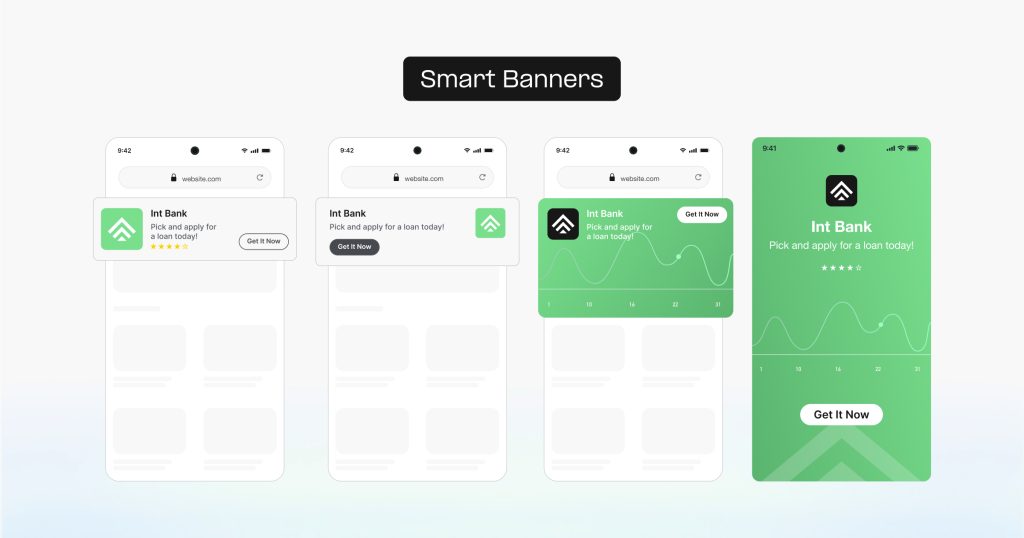
AppsFlyer smart banners detect Android users browsing your website and prompt users to move into the app. Brands using them see a +67% lift in conversions and a 13.6% average web-to-app conversion rate. A finance app, for example, uses smart banners to move users from their mobile website into the app, where in-app traffic converts at 2.8 times the rate of mobile web.
Deep linking always matters
Deep linking behavior is affected by the OS, the browser, the device, the state of the app, and whether a proper fallback strategy is in place. The wrong setup doesn’t just create a bad user experience, it has direct business impact. For existing users navigating within an installed app, standard Android App Links handle basic routing. For any campaign touching new users, lapsed users, or cross-channel journeys, a properly configured setup with a fallback strategy is not optional. Basic setups fail across too many variables to be relied on. Talk to our team about your deep linking setup.
Key takeaways
- Without deferred deep linking, the link breaks the moment the app isn’t installed
- Deep linking is an attribution, routing, and lifecycle problem that affects every campaign you run
- Android App Links and custom URI schemes both lose campaign context through the Play Store
- AppsFlyer’s OneLink covers every channel on Android with no separate links needed per channel
- Deep linking increases conversion rates by up to 4X
- Deep linking solves routing and attribution, not a weak in-app experience or poor segmentation
FAQs
A web link that opens the app and brings users directly to a specific screen inside an Android app instead of the home page. It can be placed on a website, in an email, or inside an ad. The link can carry parameters that determine which screen to open.
It preserves a user’s original destination through the app install process. They click a web link, go through the Play Store, install the app, and land on the exact screen they were headed to.
Android opens the web browser instead of the app when it cannot resolve the deep link. This happens when the app is not on the device yet, when app link verification has failed, or when the URI scheme is not registered. If multiple apps share the same URI scheme, Android may also show a disambiguation dialog instead of opening the app directly.
Use deferred deep linking. It stores the user’s intent before the Play Store and retrieves it on first open. Without it, new users land on the home screen with no context from the campaign that brought them there.
For existing users who already have the app, yes. For any campaign targeting users who might not have the app, no.
Through the Deep Linking Suite, powered by OneLink, which detects device, OS, and install status and routes users correctly. Deferred deep linking handles the install gap and attribution measures the full journey from click to in-app event.