Break up with Firebase before it breaks you: Practical migration guide


Firebase Dynamic Links (FDL) has been a comprehensive solution for deep linking in mobile apps. But when Google announced its deprecation, many developers and product teams needed to find an alternative. Once you’ve found a solution, you need to understand how to migrate from FDL.
This guide will walk you through the steps in the migration process, highlighting key considerations and best practices to ensure a smooth transition.
What you need to know
Firebase Dynamic Links shut down on August 25th, 2025. Developers now need to adopt alternative solutions like App Links, Universal Links, or third-party deep-linking providers.
Existing links continued to work until the shutdown, but new links can no longer be created.
Developers should also export their link metadata and consider updating their apps to handle changes in deep-linking functionality after the service is discontinued.
When exporting existing Firebase Dynamic Links, it is essential to audit your existing links and prioritize high-traffic ones. Link metadata export can be invaluable for your migration once you select your alternative.
What to prepare for a successful migration
First, get a firm understanding of your app release cycles and app version update trends. How long does it take for your app to be updated among all users?
Second, you need a clear picture of your current setup and what your new solution must support. For new projects, ensure you use the new deep linking solution from the start to avoid future migration issues:
- Assess your current usage:
- Which user flows rely on them? Things like first-time user experience during onboarding, referrals, app promotions, paid campaigns and more.
- How are links getting generated? Manually, inside marketing tools, backend APIs, in-app content sharing, etc.
- How is it measured? Which source drove the clicks, engagement, and conversion?
- Define your requirements — a critical step to avoid surprises with cost, API limits, or performance when you look for alternatives.
- Here is a list of potential needs:
- Cross-platform deep linking – iOS and Android in a single link.
- Deferred deep linking
- Branded link domains
- Campaign-level measurement and analytics
- QR code support
- SDK performance and integration complexity
- Estimate volume and scale
- Daily/monthly link generation and the processes to do so (automatic vs. manual).
You will also need to provision a new domain to host your App Link or Universal Link configuration files.
How to migrate: Implementation checklist
1) Choose your alternative
Use your setup requirements from the previous section to shortlist and test potential solutions. We strongly recommend using Android App Links and iOS Universal Links for simplicity in the migration process.
2) Configure your deep linking
- If you choose a third-party provider, you should manage the configuration, including the branded domain, certificates, and DNS CNAME.
- For your Android app, update the app manifest to configure intent filters that handle deep link URLs and associate your app with App Links. You must also host an assetlinks.json file on your website domain. This file establishes a secure association between your domain and your Android app for App Links. Verify the URL for assetlinks.json to ensure it is accessible.
- For your iOS app, update project settings to configure associated domains and handle Universal Links. This includes modifying entitlements, updating application code to receive deep link URLs, and hosting an apple-app-site-association file on your website domain. The apple-app-site-association file provides a list of authorized apps that can handle the contents of the web domain for Universal Links. Verify the URL for apple-app-site-association to ensure it is accessible.
- Integrate your provider’s SDK into your mobile app(s).
3) Create a link mapping strategy
Map each FDL type or use case to its equivalent in the new system, ensuring that each link is mapped to the correct app page or web page. Document this logic clearly for developers, QA, and support teams.
4) Translate the links from the Firebase format to the new format
After you map out your links, you know what data scheme and granularities they support. Now you have to understand what parameters on the new link are supporting the same functionality.
There are several options:
- It’s only a different name. This is easy because there’s 1:1 mapping.
- It’s not supported out of the box. In this case, you’ll need to create a custom parameter.
- It’s supported on a different granularity level. In this case, you’ll have to determine the right granularity to report on.
5) Implement redirect handling
If possible, set up redirects from your old FDL domain to your new link domain. This may require control over the domain used in your Firebase project.
If you own the domain, you can set up a redirect to the new domain.
If you don’t own the domain, there are several things you can do:
- Switching to a custom domain in Firebase for deep links if possible.
- Creating a proxy server to handle the redirects.
- Communicating with users to update old links manually across channels.
6) Update application code
- Integrate the new SDK.
- Update link parsing and routing logic based on the new SDK functionality. Ensure the new SDK supports navigating users to the correct screen or content within the app, whether the app is already installed or not. You should handle cases where the app is not installed by using deferred deep linking, so users are routed to the intended content after installation.
- Maintain backward compatibility with legacy links if needed.
7) Phased migration
A gradual migration can reduce the risk of breaking flows. It is recommended to start with links that are lower risk and/or lower traffic.
The more flows you stabilize, the higher the confidence you have and you can add more use cases to the mix until you come to completion.
8) Test, test, and test!
Testing is a critical part of the implementation. The more you test, the higher the confidence.
What to test?
- iOS and Android, across OS versions
- Fresh installs, updates, and re-engagements.
- Different link types (web, app, SMS, email, QR codes, etc.)
- Edge cases like offline access or link-sharing apps
- User clicks on App Links and Universal Links by creating clickable links and verifying they open the intended activity or screen in your app
How to migrate from Firebase to AppsFlyer
You can migrate from Firebase Dynamic Links to AppsFlyer’s Deep Linking Suite in just a few steps. Here, we’ll walk you through the process, but for a more in-depth process see our step-by-step guide on how to migrate from Firebase.
Step 1: Create an AppsFlyer account
Create an AppsFlyer account, and add account users with appropriate permissions.
Step 2: Add your app
Add your app in AppsFlyer’s Deep Linking Suite. At this stage you can also set your re-attribution window to align with your own definition of active users. This is set to 90 days by default.
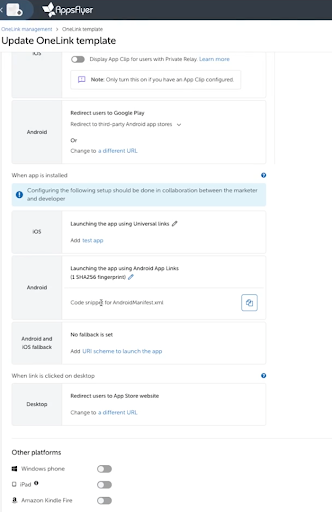
Step 3: Create a OneLink template
A OneLink template forms the basis of all redirection logic for all the deep links you create. You must be either an AppsFlyer admin user or have permissions to add/edit OneLink templates.
Step 4: Set up the AppsFlyer SDK
The AppsFlyer SDK forms the link between the app and AppsFlyer platform. It provides unified deep linking and attribution.
Step 5: Understand parameter mapping
Firebase Dynamic Links uses different parameters to AppsFlyer. Correct mapping and understanding of how these parameters correspond will ensure your links get the same results once you’ve migrated from Firebase.
Step 6: Create OneLink links with mapped parameters
Using your mapped parameters, you can now create OneLink links from your template. These can be created in bulk via CSV file; programmatically with the OneLink API; individually using the AppsFlyer dashboard; in the SDK; or as manually constructed longlinks.
For more guidance on how to migrate from Firebase Dynamic Links to AppsFlyer’s Deep Linking Suite, see our Help Center.
Why migrate from Firebase to AppsFlyer?
Migrating from Firebase Dynamic Links to AppsFlyer doesn’t just mean you can keep your deep linking campaigns running: it also opens up long-term advantages. AppsFlyer’s Deep Linking Suite is designed to scale with your app.
While Firebase was designed to optimize Google ad products, AppsFlyer integrates 90+ cost API partners and 350+ click partners, giving you omnichannel ROI visibility that includes platforms like Meta, TikTok or Snap.
AppsFlyer’s Deep Linking Suite also includes features that are not available with Firebase: Smart Banners, Smart Scripts, ESP integrations and more, all production-grade and actively maintained to provide a smooth customer journey.
Best Practices for Migration
Optimizing your flows
Migrating from Firebase is a good opportunity to clean up old flows, fix things that don’t perform well and fund new ideas for improvement.
Make sure to document these changes along the way. After everything is sustained, you can start improving and optimizing your flow to maximize your retention, conversion rates, or any other KPI.
The bottom line
Migrating away from Firebase Dynamic Links is a necessary step now that it is no longer functioning, but it doesn’t have to be overwhelming. By assessing your current setup, defining needs, and selecting the right alternative, you can ensure a smooth transition without losing functionality.
The key is to plan and execute your migration in stages. Testing and gradual implementation will allow you to eliminate issues and optimize your deep linking strategy for the future.
Keep in mind that the migration also offers an opportunity to streamline your user flows, enhance your app’s performance, and ultimately drive greater user engagement.
Ready to migrate rapidly? AppsFlyer’s Deep Linking Suite provides tools and services to help you complete the migration as fast as you need without compromising quality. Read more.
FAQ
All existing Firebase Dynamic Links stopped working on August 25, 2025. Users who click any FDL after that date will not be routed to your app. Plan your migration timeline with that hard cutoff in mind.
Yes. Any migration away from FDL requires an SDK update. Users on older app versions that haven’t updated may still attempt to follow FDL-formatted links; factor this into your backward compatibility plan and communicate the timeline to your team.
Universal Links (iOS) and App Links (Android) are verified associations between a domain and your app. When a user taps the link and your app is already installed, they go straight to the right in-app screen. Deferred deep linking extends this: if your app isn’t installed yet, the user is sent to the App Store or Google Play, and once they install and open the app for the first time, they’re routed to the content the original link was pointing to.
If you’re migrating to a dedicated MMP like AppsFlyer, then clicks on new OneLink-formatting links will attribute normally from day one. Attribution is tied to the SDK and postback setup, not the link format itself. The risk is the gap period: links generated before migration that point to the old FDL domain. Set up redirects where possible and track the overlap window closely.
Not directly – SKAdNetwork attribution is handled at the MMP level, not the deep linking layer. But if you’re migrating to an MMP like AppsFlyer at the same time, you’ll want to confirm your SKAN configuration is correctly set up during the SDK integration step.